Download PDF
Aquarino Controller — User Manual · Printed from manual.aquarino.com.br/en/controller/18-custom-preferences/
PART IVGetting to know the screens
CHAPTER 18
Custom. — preferences
This screen gathers the display and unit preferences. Nothing here changes how the equipment works — only how it talks to you. Each option is applied on the spot, with no save button.
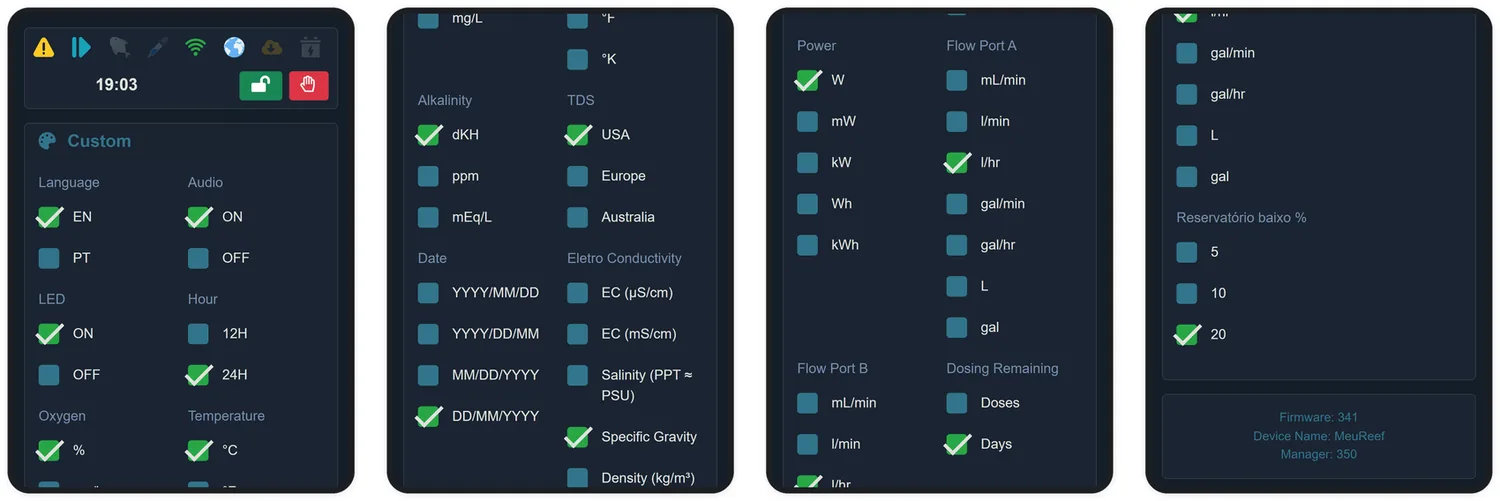
| Preference | Options |
|---|---|
| Temperature | °C, °F or °K |
| Power | W, mW, kW, Wh or kWh |
| Flow Port A / B | mL/min, L/min, L/h, gal/min, gal/h — or the accumulated total in L or gallons |
| Date | DD/MM/YYYY, MM/DD/YYYY, YYYY/MM/DD or YYYY/DD/MM |
| Hour | 12H or 24H |
| Language | Portuguese or English |
| LED | Turns the panel lighting on or off |
| Audio | Turns the alert beep on or off |
| Alkalinity | dKH, ppm or mEq/L |
| Eletro Conductivity | µS/cm, mS/cm, salinity (PPT ≈ PSU), specific gravity or density (kg/m³) |
| Oxygen | % saturation or mg/L |
| TDS | Conversion factor: USA (0.55), Europe (0.64) or Australia (0.70) |
| Dosing Remaining | Show what is left in the dosers in doses or in days |
| Low reservoir % | The percentage at which the reservoir starts warning: 5, 10 or 20% |