Download PDF
Aquarino Controller — User Manual · Printed from manual.aquarino.com.br/en/controller/10-home-screen/
Home screen
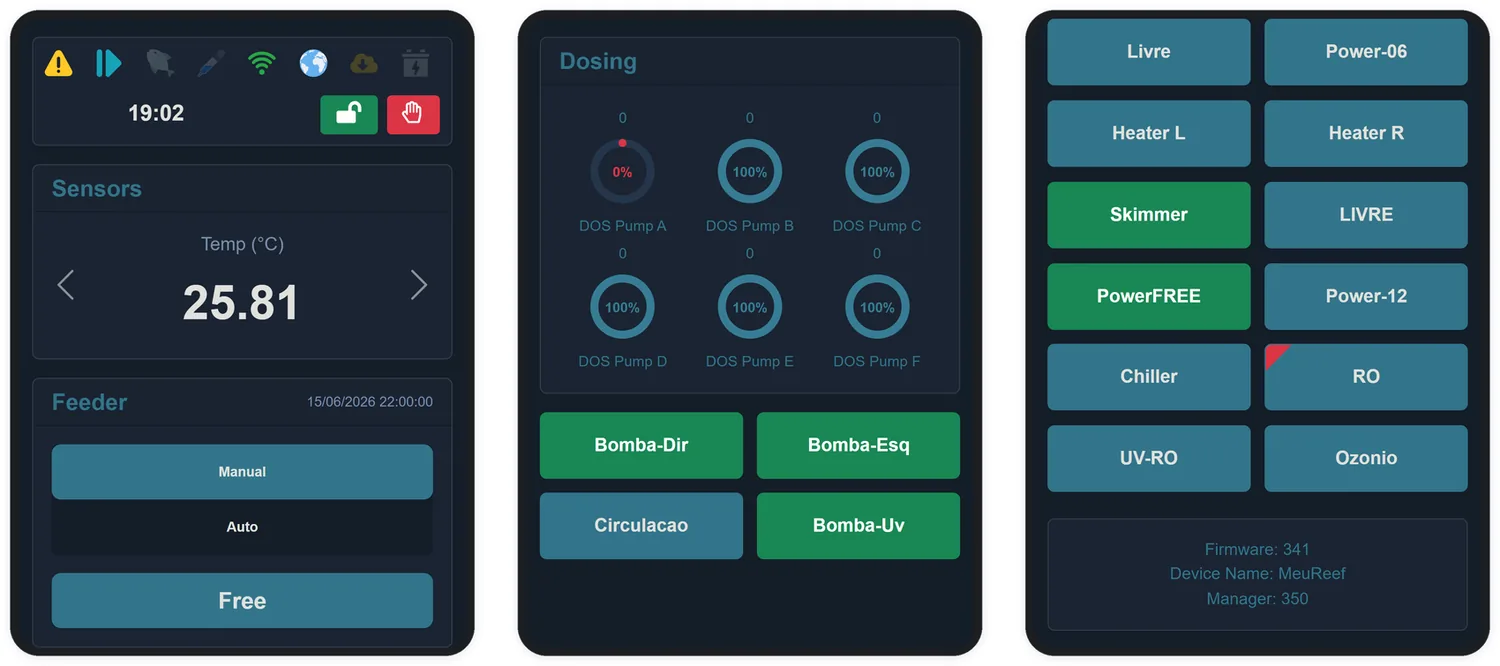
The Home screen exists to answer, within three seconds, the question of every morning: is everything all right with my aquarium?
10.1 Sensors
The Sensors block is a carousel of the sensors you marked as favourites on the Sensors screen (Chapter 12). One sensor at a time, changing every 10 seconds — or via the side arrows. The value appears in red when the sensor is outside its alert limits.
10.2 Feeding
Shows the current mode (Manual or Auto), the date of the last feeding and the Feed button, which triggers an immediate feeding. During the feeding period, the button becomes Stop Feed, to end it early.
10.3 Dosing pumps
A progress ring per pump, with the percentage left in the reservoir at the centre and the number of doses (or days) remaining above it. The ring turns red when the reservoir crosses the "low reservoir" limit set on the Custom. screen.
10.4 Outlets
One button per outlet, with the name you gave it: green when on, blue when off. Tapping a button turns the outlet on or off right away — and puts the system into manual mode (Chapter 3).