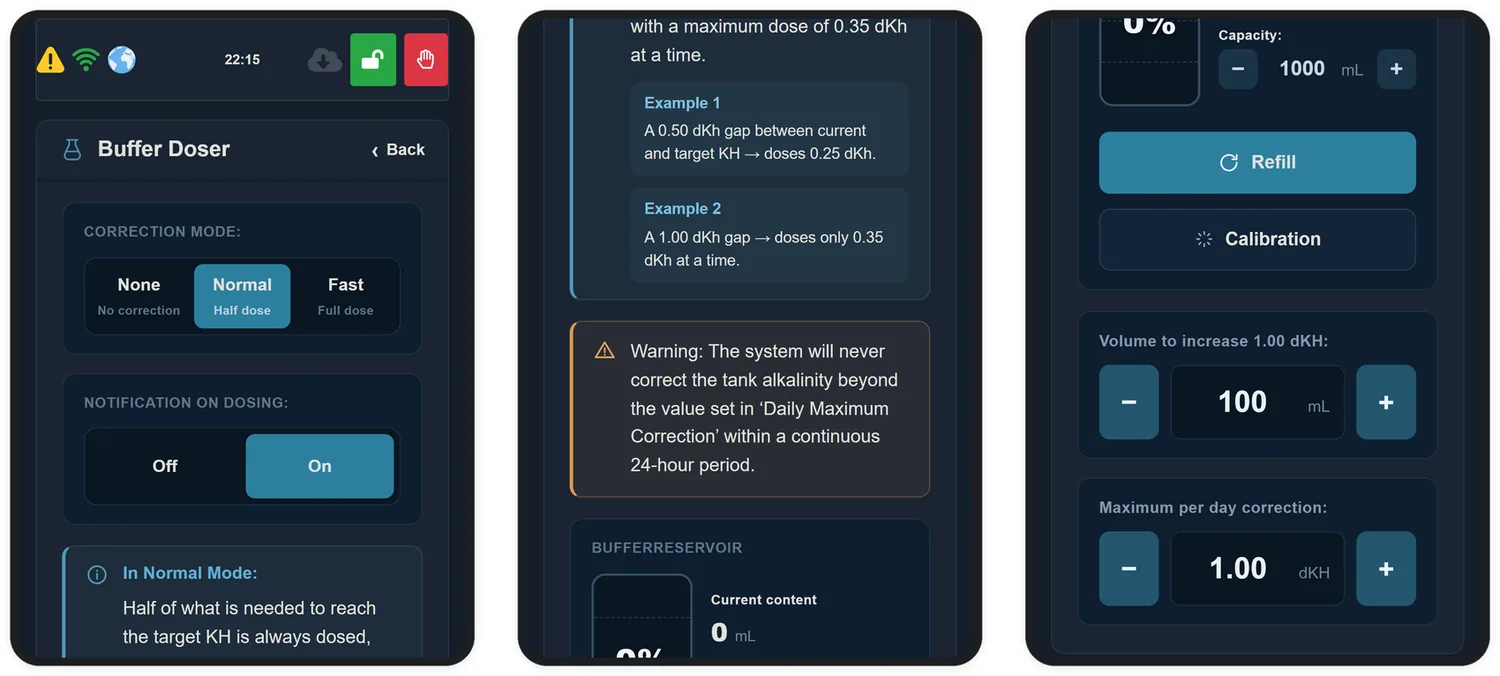
In this mode an external dosing pump connected to the KH Buffer port raises alkalinity when it falls below the band. It is the mode for anyone using 3-in-1 balling, and a good safety net for anyone on a calcium reactor — if the CO2 runs out, the doser holds the fall.
The Buffer Doser screen: mode, reservoir, calibration and limits.
16.1 Choosing the correction mode
Mode
What it does
None
No correction. The doser is never driven
Normal
Doses half of what is needed to reach the target, with a maximum of 0.35 dKH per dose
Fast
Doses the full difference to the target, within the mode's ceiling
16.2 Calibrating the dosing pump
Calibrating the pump is what makes an order to "dose 25 mL" actually deliver 25 mL. Doser tubing loses flow with use, so it is worth repeating this from time to time.
Open Configuration → Buffer Doser → Calibration. Three steps:
Step 1 · Fill the tubing
Click Purge and let the pump run until the tubing is completely full of buffer, with no bubbles. Click Stop when done.
Step 2 · Measure what the pump delivers
Put the end of the tubing into a graduated container — a cylinder, syringe or measuring cup.
Click Start Calibration. The pump will run for 60 seconds.
Measure the volume delivered and enter it in Measured volume, in millilitres.
Step 3 · Check
Adjust the Dosing rate and click Test. The equipment should deliver 5 mL of buffer.
If it delivered
What to do
More than 5 mL
Lower the dosing rate and test again
Less than 5 mL
Raise the dosing rate and test again
5 mL
Done. The pump is calibrated
16.3 Telling it what your product yields
With the pump calibrated, the equipment still needs to know what your product yields. The Volume to raise 1.00 dKH field is what turns "dose 0.25 dKH" into millilitres: it wants the volume, in mL, that raises your whole system by 1 dKH.
To work it out you need two numbers — the product's yield and the real water volume of your system.
Balanced — calcium and alkalinity in one bottle
Product
Solution
For 1 dKH in 100 L
Tropic Marin — All-For-Reef Powder
powder: 160 g to 1 L
16.7 mL
Tropic Marin — Carbo-Calcium
powder: 140 g to 1 L
16.7 mL
Tropic Marin — All-For-Reef
ready-mixed liquid
17.85 mL
Fauna Marin — Ready2Reef
ready-mixed liquid
17.85 mL
Barrak — ONE
powder: 150 g to 1 L
≈ 17.85 mL
Aviv Reef — Total Reef
ready-mixed liquid
≈ 17.85 mL
Alkalinity only
Product
Solution
For 1 dKH in 100 L
Triton — Core7 Base Elements 2
ready-mixed liquid
5.1 mL
Barrak — BUFFER
Barrak solution
6.25 mL
Barrak — Balling B (KH)
ready-mixed liquid
6.3 mL
Brightwell — Alkalin8.3
ready-mixed liquid
8.5 mL
Seachem — Reef Carbonate
ready-mixed liquid
8.9 mL
ESV — B-Ionic Alkalinity
ready-mixed liquid
12.8 mL
Aquaforest — KH Plus
ready-mixed liquid
20 mL
Fauna Marin — Balling Light Carbonate
powder: 100 g to 1 L
20 mL
Red Sea — Foundation B (KH)
ready or powder 100 g/L
29.4 mL
Triton — CO3
ready-mixed liquid
33 mL
Tropic Marin — Original Balling B
powder: 76 g to 1 L
35.7 mL
Aquaforest — KH Buffer
powder: 80 g to 1 L
38.5 mL
Seachem — Reef Builder
powder: 40 g to 1 L
71 mL
MBreda — Reef Basis B
powder: 50 g to 1 L
71 mL
16.4 Maximum per day correction
This is the equipment's safety stop: the total it may raise alkalinity within a continuous 24-hour window. The default is 1.00 dKH per day.
16.5 The buffer reservoir
The screen shows the current content in mL and the percentage left. Set Capacity to your bottle's volume and tap Refill every time you top it up — that is how the equipment knows how much remains.
When the level crosses the percentage set in Custom. → Low KH Buffer %, the indicator turns red on the home screen and you get a warning.