Aquarino KH — User Manual · Printed from manual.aquarino.com.br/en/kh/14-target-alkalinity-frequency-and-alerts/
PART VPutting it to work
CHAPTER 14
Target alkalinity, frequency and alerts
This is the screen that governs almost everything: the value you consider ideal, how much variation you tolerate, how often to measure and how you want to be told. You reach it through Configuration → Target Alkalinity.
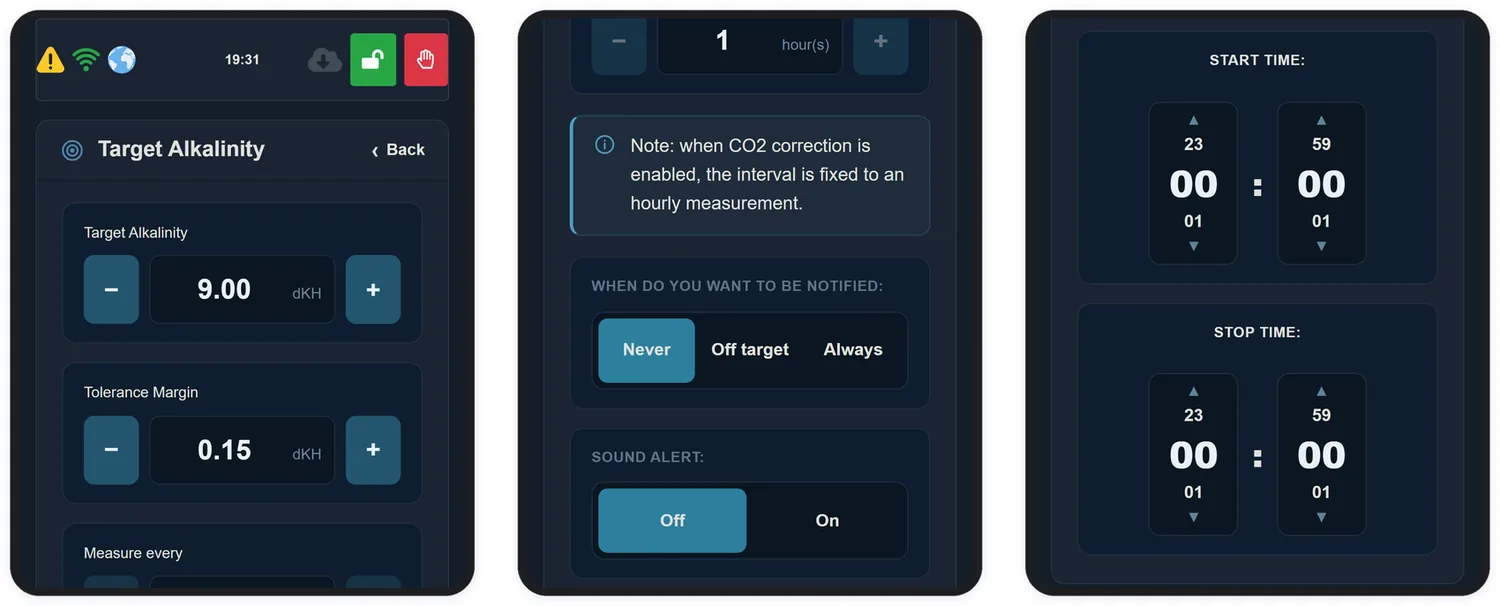
The Target Alkalinity screen holds target, margin, frequency, notification and time window. With the Alkalinity Doser or CO2 Port control on, it warns that the equipment is measuring every hour, 24 hours a day.
14.1 Target alkalinity
This is the KH you want to hold. For reef aquariums the usual range is 7 to 9 dKH.
14.2 Tolerance Margin
The margin sets the band around the target within which the equipment considers everything fine. It runs from 0.15 to 1.00 dKH.
14.3 Measurement frequency
The Measure every field sets the interval in hours, from 1 to 24. Since measuring consumes no reagent, there is no cost in measuring often.
Interval
When it makes sense
1 hour
Aquariums with a calcium reactor, unstable systems and the first days of use. With the CO2 Port or the Alkalinity Doser on, the equipment already measures every hour on its own
2 to 4 hours
General use. Good resolution to follow the daily cycle without crowding the graph
6 to 12 hours
Very stable systems, where you only want to watch the trend
14.4 Time window
Start time and Stop time limit measurements to a period of the day. Leaving both at 00:00 means the equipment measures around the clock.
14.5 Notifications
The field When do you want to be notified sets when the equipment sends e-mail:
Option
Behaviour
Never
No measurement e-mails. You still see everything in the app
Off target
E-mail only when KH leaves the band set by target and margin
Always
E-mail on every completed measurement
14.6 Sound Alert
Turns the audible warning on or off when KH is outside the band. The panel colour LED keeps working either way.