Download PDF
Aquarino KH — User Manual · Printed from manual.aquarino.com.br/en/kh/16-alkalinity-doser/
Alkalinity Doser
Corals consume alkalinity — KH — all the time: more during the day, with the lights on, and less at night. The Alkalinity Doser gives back to the aquarium what was consumed and keeps KH close to the target you chose, without letting the value rise or fall suddenly.
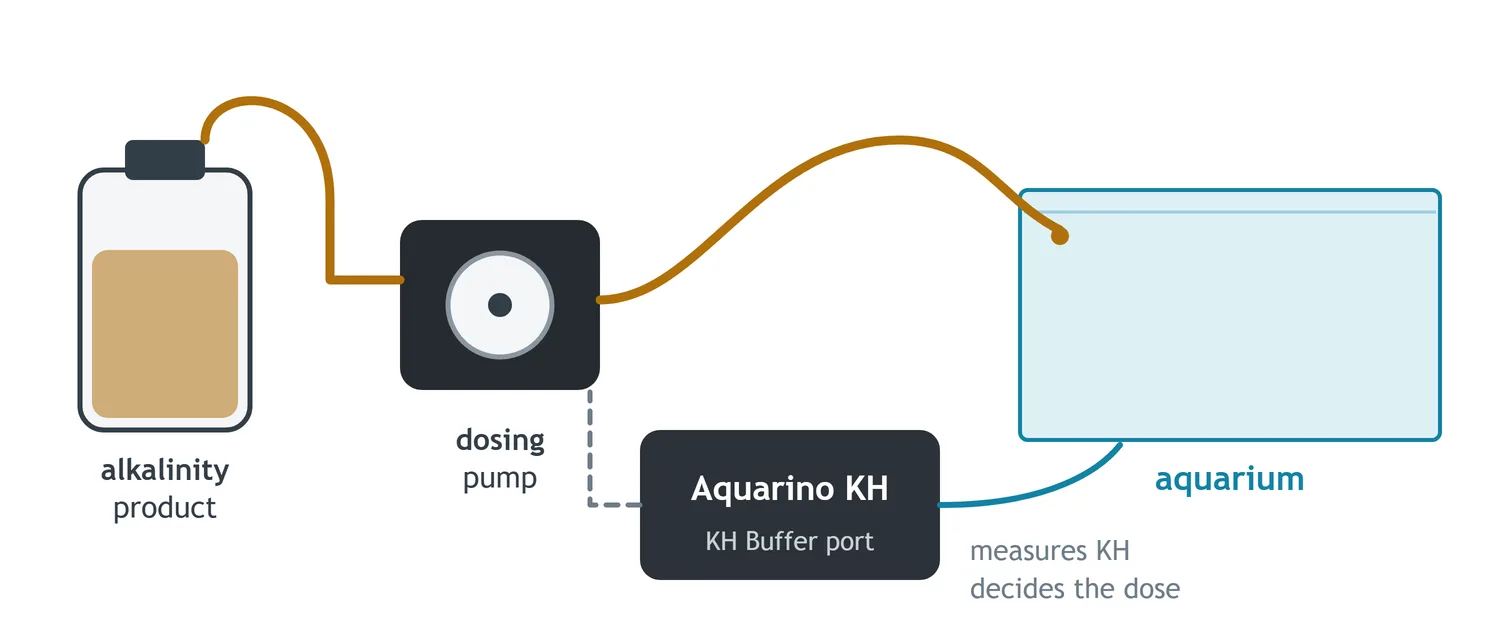
It is an external dosing pump connected to the panel's KH Buffer port, set up in Configuration → Alkalinity Doser. It works with any alkalinity product — 3-in-1 balling, All-For-Reef, alkalinity-only buffer — and the equipment does not ask which: it sees the result in its own measurement.
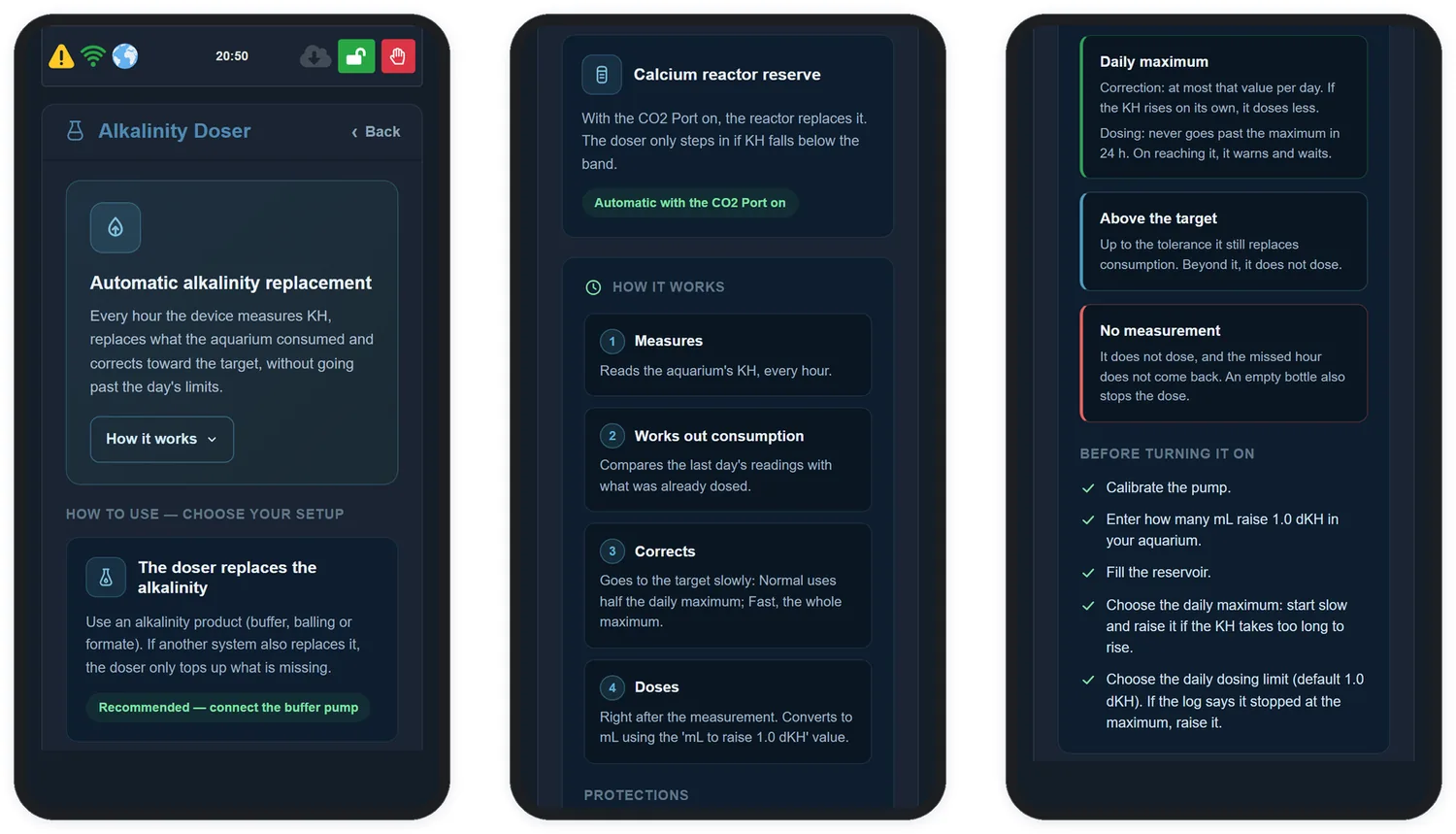
When you open the screen, the top shows a guide to the doser itself: Automatic alkalinity replacement, with a summary of the cycle and the How it works button, which shows or hides the rest. It starts open and sums up, in a few lines, what this chapter explains in detail:
| Part of the guide | What it shows | Where it is in the manual |
|---|---|---|
| HOW TO USE — CHOOSE YOUR SETUP | The doser replacing the alkalinity, or as the calcium reactor reserve | Section 16.4 |
| HOW IT WORKS | Measures every hour, works out consumption, corrects and doses right after each measurement | Sections 16.1 and 16.2 |
| PROTECTIONS | Daily maximum, above the target and no measurement | Sections 16.3 and 16.9 |
| BEFORE TURNING IT ON | Calibrate the pump, enter the mL to raise 1 dKH, fill the reservoir, choose the daily maximum and set the daily dosing limit | Sections 16.3 and 16.5 to 16.7 |
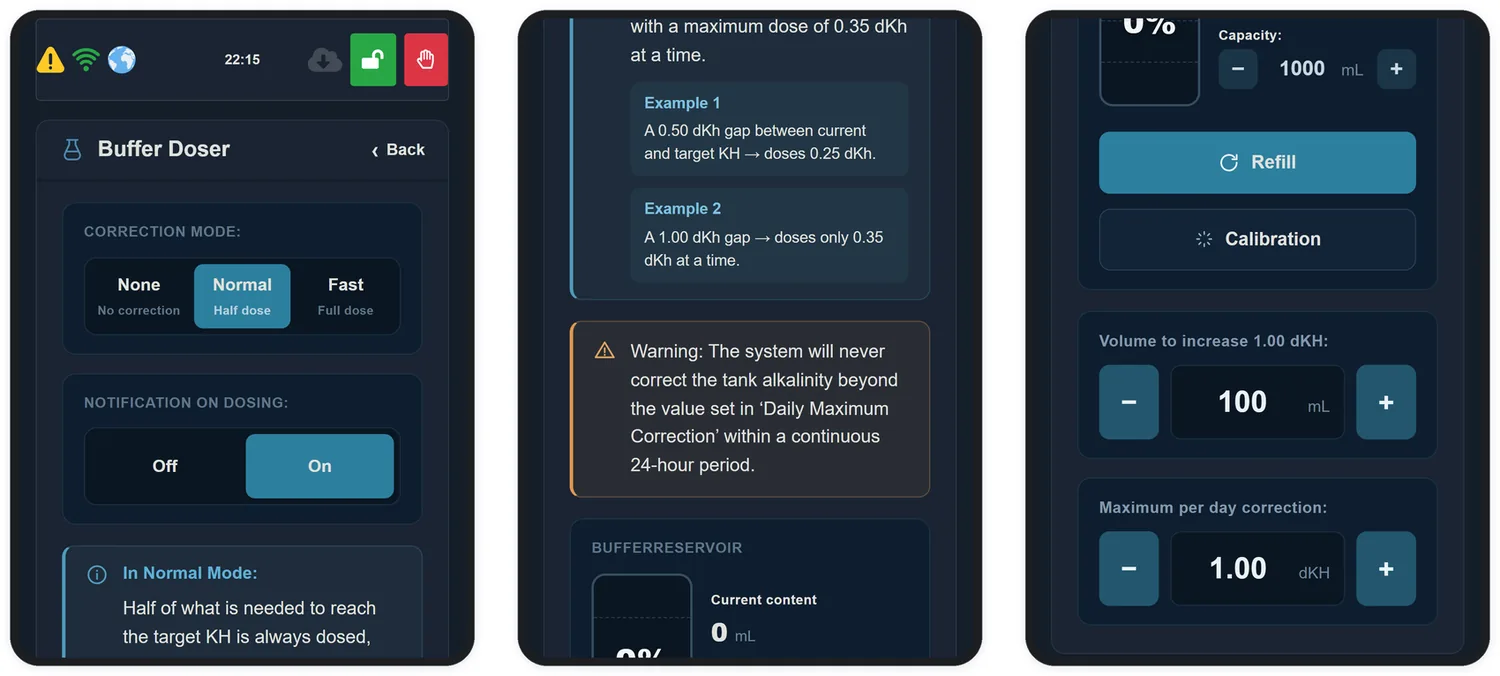
Right below the guide are the controls:
16.1 How it works
With the doser on, in Normal or Fast mode, the device measures KH every hour, 24 hours a day, and doses right after each measurement. The interval and the time window you chose on the Target Alkalinity screen stay stored and apply again when you turn the doser off (sections 14.3 and 14.4).
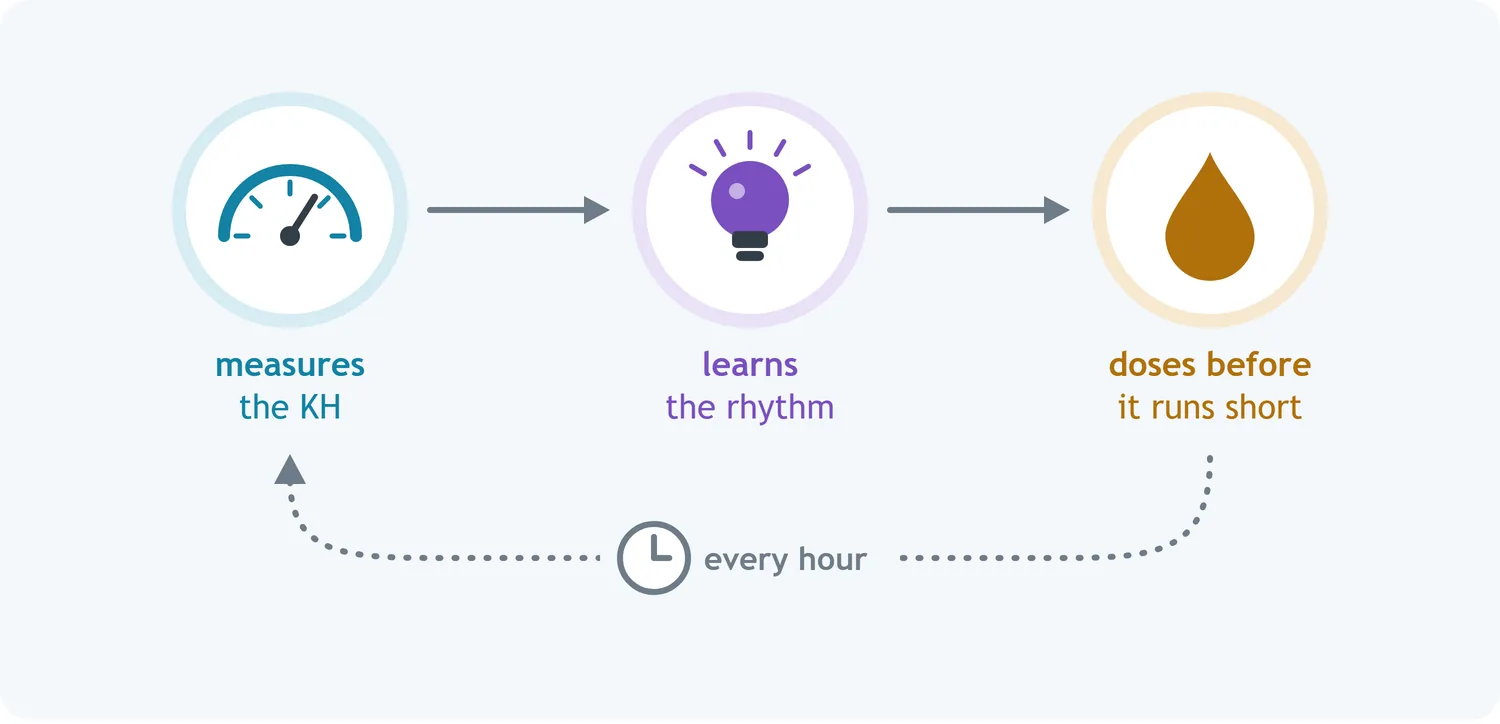
With every measurement it learns a little more about your aquarium: how much it consumes at each hour of the day — more with the lights on, when corals calcify, and less at night. That lets the doser stay one step ahead: it doses what the aquarium will consume until the next measurement, instead of chasing what is already missing. The result is a stable KH, with no sudden rises or drops.
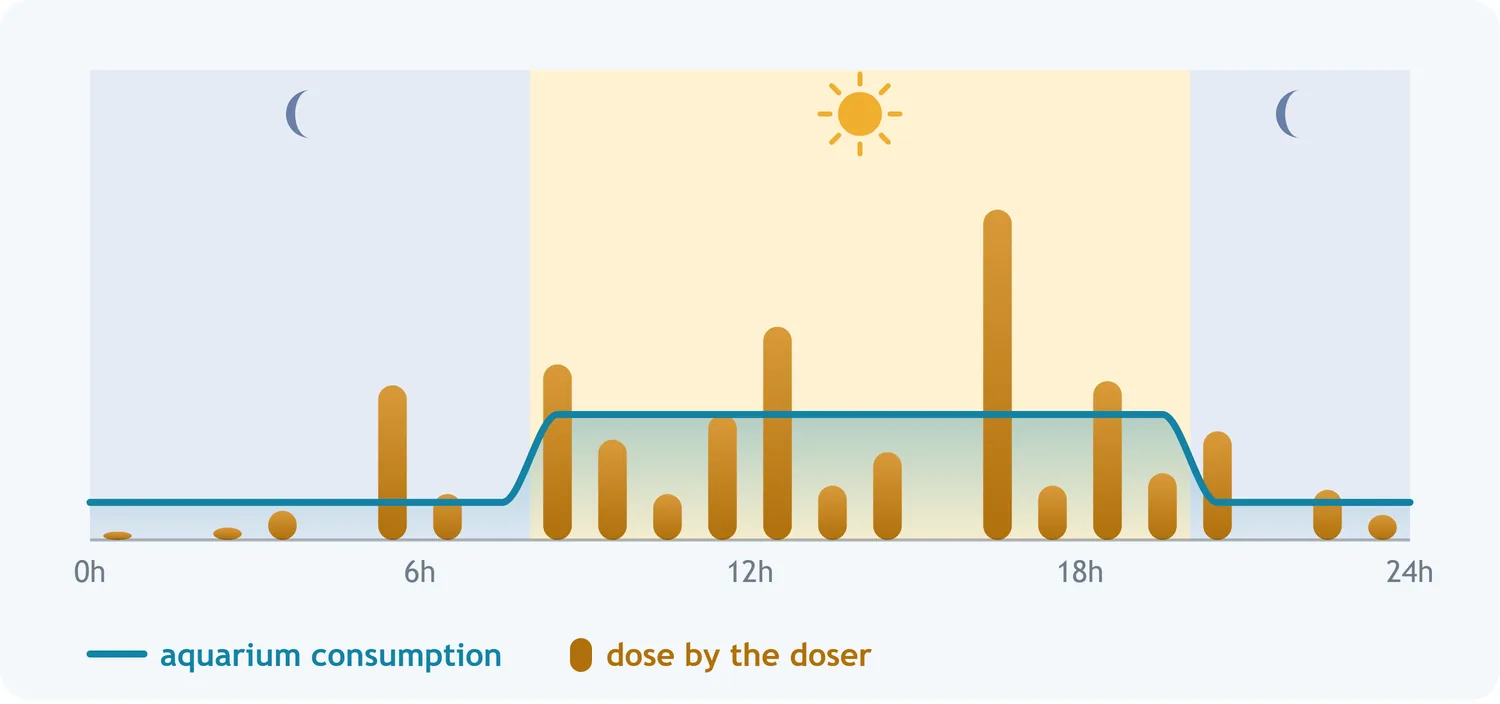
It also checks, measurement by measurement, how much each dose really raises KH, and makes up for small differences between the yield you entered and the real one. A value that is far off is not something it can fix: entering the right yield still matters (section 16.7).
What it does in each situation
The doser looks at where KH stands in relation to the target and to the tolerance margin you chose on the Target Alkalinity screen:
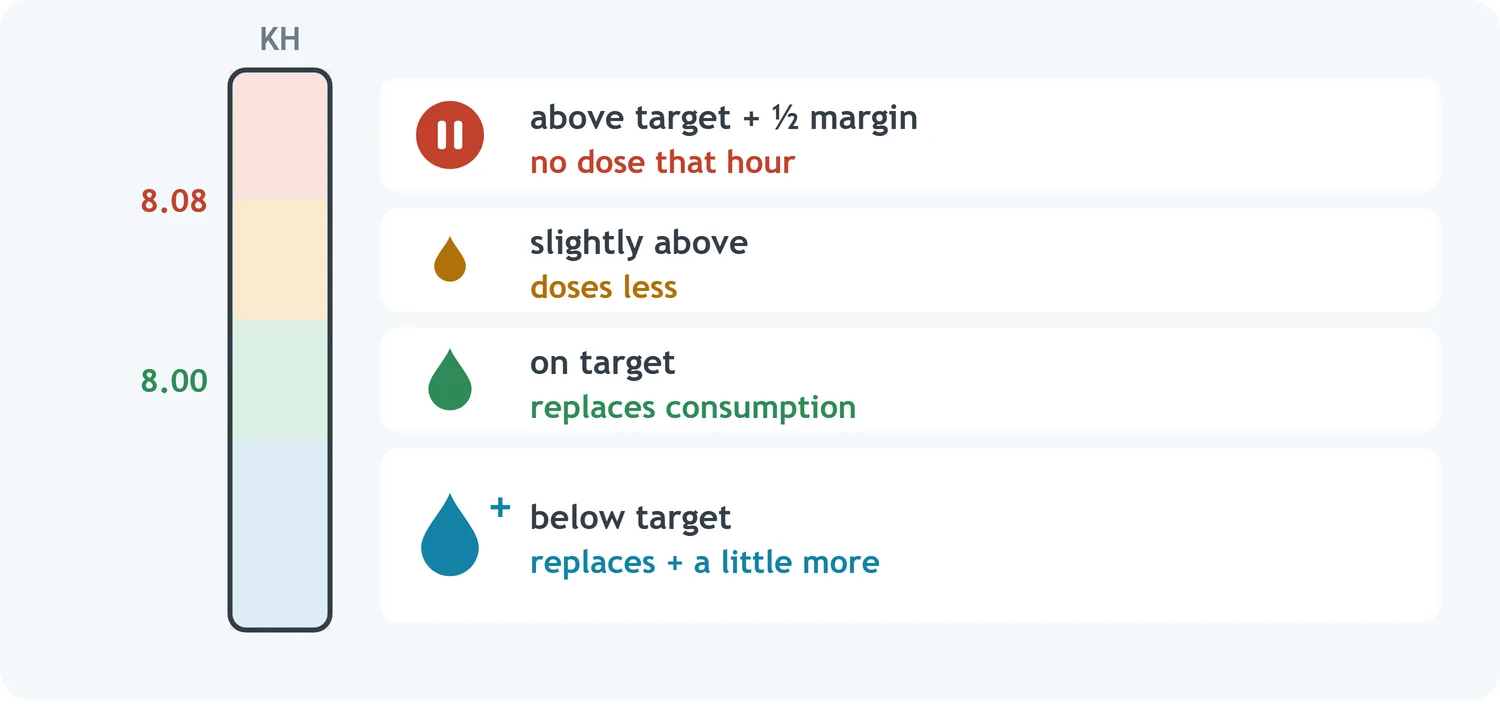
- KH dropped over the last few hours — during a consumption peak in the late afternoon, for example: it gives that drop back right away, without waiting.
- Reading above the target plus half the margin — with the target at 8.00 and the margin at 0.15, from 8.08: it does not dose that hour, and the next measurement decides again.
Hour without a measurement, hour without a dose
If a measurement does not happen — a failure, the device switched off —, that hour goes without a dose, and nothing is made up all at once later. The next measurement picks up from the current reading.
16.2 Correction mode
The mode turns the doser on and sets how gently it corrects towards the target. Both modes replace consumption the same way.
| Mode | On screen | What it does |
|---|---|---|
| None | Off | Does not dose |
| Normal | Gentle | Corrects towards the target by up to half the maximum daily correction per day |
| Fast | At the limit | Corrects towards the target by up to the whole maximum daily correction per day |
16.3 The limits of each day
The doser has two daily limits, which you set on the screen. They do different things:
| Field | What it limits |
|---|---|
| Maximum daily correction | Only the approach to the target: how much KH may change in one day to get there. Replacing consumption, including a drop over the last few hours, is left out of this count |
| Daily dosing limit | Everything the pump delivers in 24 hours, consumption replacement and correction added together. It is the safety ceiling and, with KH below the target, what holds back the speed of the rise |
Maximum daily correction
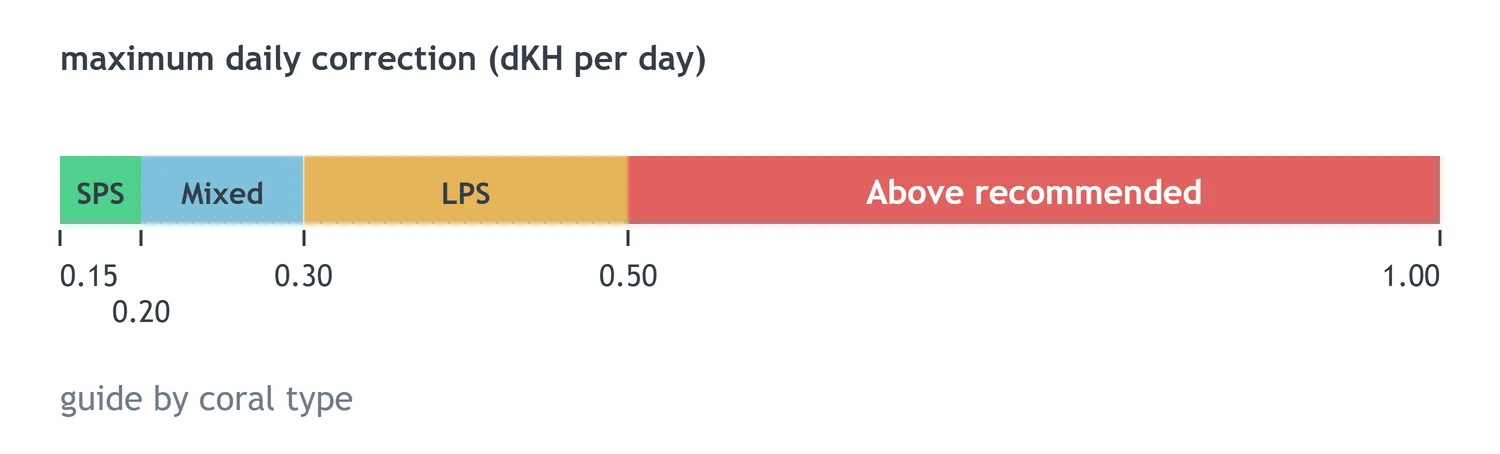
This is how much KH may change in one day in the correction towards the target, not counting consumption replacement. It goes from 0.15 to 1.00 dKH per day, and the factory default is 0.15, the most cautious value. Below the field, Corrected in the last 24 h shows how much of the correction has already been used.
Below the value, the screen shows a guide by coral type. It does not lock anything: you choose any value in the range, and the screen shows which type of corals it suits.
| Coral type | Daily maximum | For whom |
|---|---|---|
| SPS | up to 0.20 dKH | Mostly small-polyp stony corals |
| Mixed | up to 0.30 dKH | Aquariums with SPS, LPS and soft corals together — a good starting point for most |
| LPS | up to 0.50 dKH | Mostly large-polyp stony corals and soft corals |
| Above recommended | above 0.50 | Above the guidance, for when you are watching the aquarium closely |
Daily dosing limit
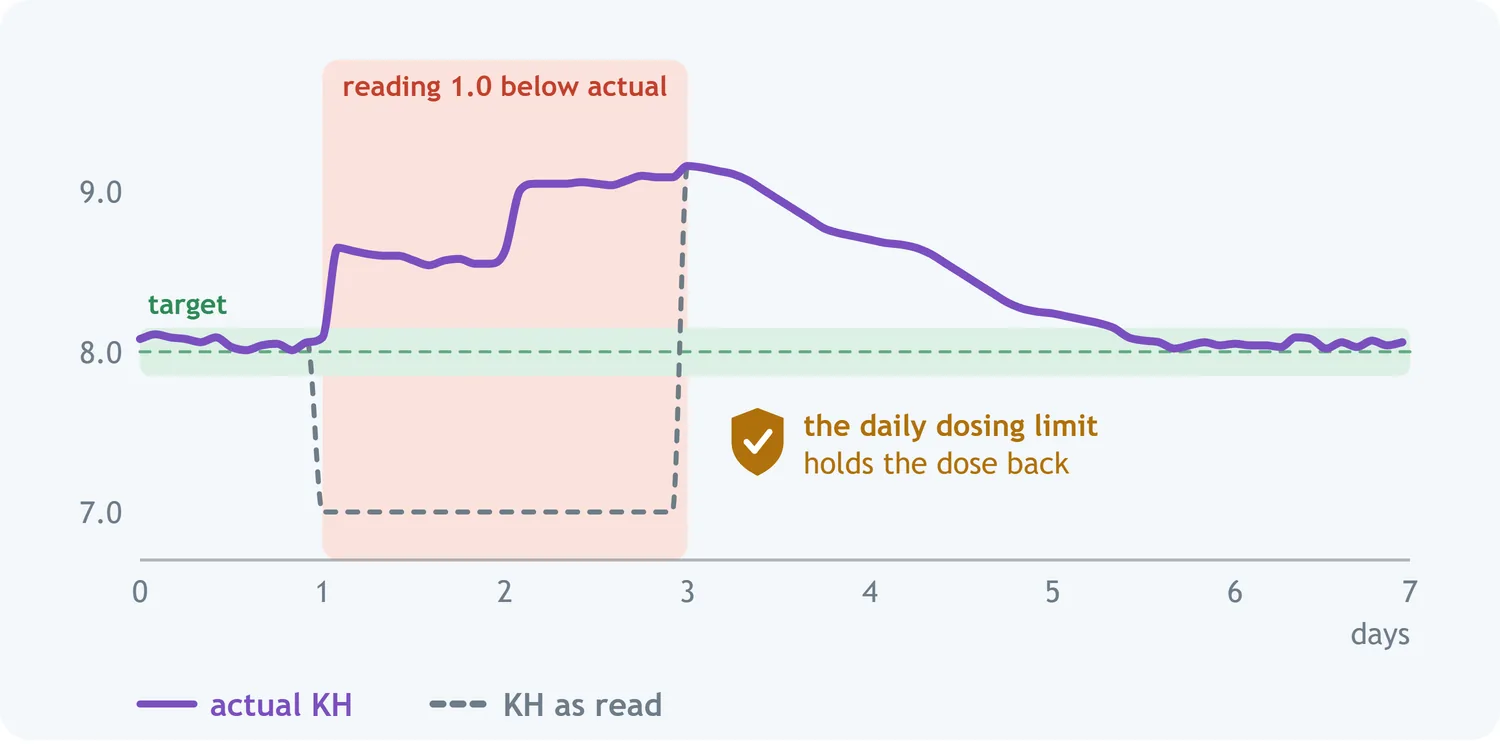
This is the total the doser may deliver in any 24 hours, consumption replacement and correction added together. It is your aquarium's most important protection: if the device stops seeing KH change — a faulty probe, a wrong calibration, a wrong value in mL to raise 1.0 dKH —, the doser may think it needs to dose a lot, and the daily dosing limit does not let it, even with the wrong reading.
The default is 1.0 dKH per day, and the field accepts 0.1 to 10.0. Below the value, the screen shows how much it represents in millilitres per day and, under Dosed in the last 24 h, how much has already left the pump. This count, like Corrected in the last 24 h, adds up the measurements of the last 24 hours, not of the calendar day.
When the total of the last 24 hours reaches the maximum, the doser pauses until the oldest doses leave the 24-hour window, and the device keeps measuring. You find out in three ways: a line in the event log, an e-mail — even with notifications turned off — and the message Daily dosing limit reached. Consumption rose or another replacement failed. on the screen. When the window frees up, the doser resumes on its own.
16.4 If you have another replenishment system
There is no need to tell the device anything: it notices on its own.
| Your system | What the doser does |
|---|---|
| Calcium reactor with CO2 Port control on (Chapter 17) | The port takes care of KH. The doser stays in reserve and only steps in after three measurements in a row with KH below the band — for example, because the CO2 ran out. When the port copes again, the doser stops on its own |
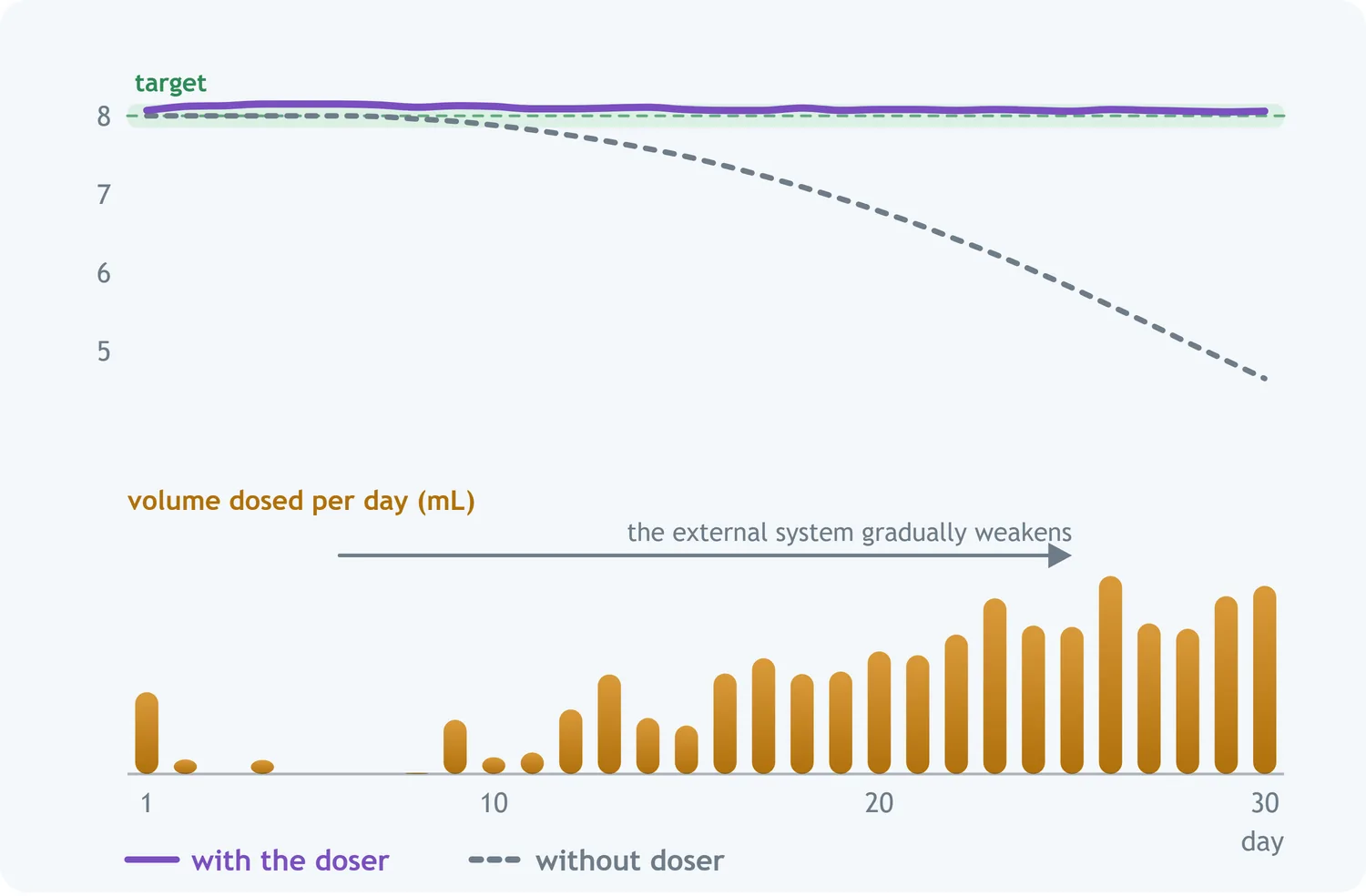
| External dosing pumps, a reactor without port control, or kalkwasser | The doser only tops up what is missing. If your system covers everything, it hardly doses at all. If it covers half, the doser makes up the other half |
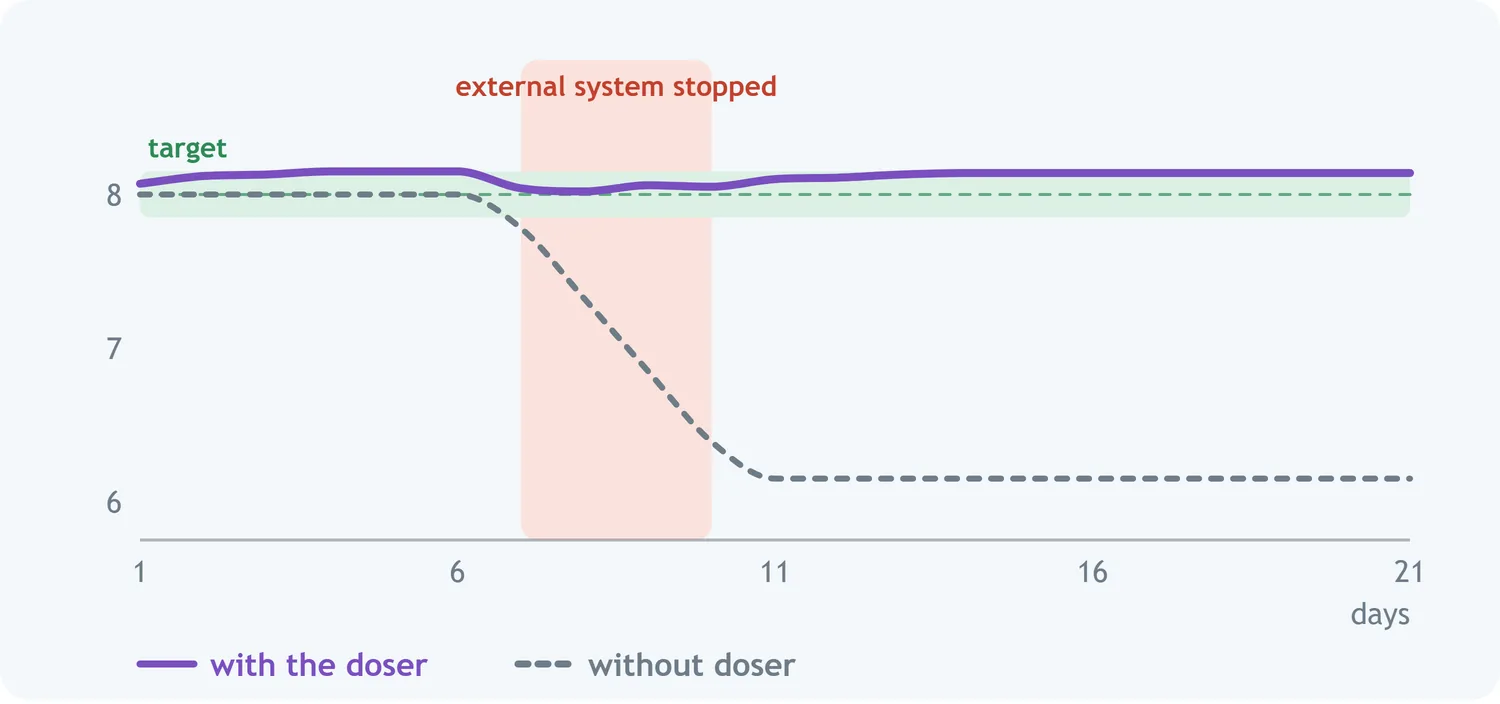
At first, with another system already replacing everything, the doser may dose a little until it understands your aquarium; after that it stays practically idle. Since it can only add, KH may end up a little above target, within your tolerance margin — that is normal.
16.5 What you need to set up
- Calibrate the pump, so the device knows how much product comes out (section 16.6).
- Enter the mL to raise 1 dKH for your product in your aquarium (section 16.7). The field comes from the factory set to 1 mL, which suits no product: without the right value, the doser does not dose properly.
- Enter the bottle size, in Capacity, to keep track of how much is left.
16.6 Calibrating the pump
Calibrating the pump is what makes an order to "dose 25 mL" actually deliver 25 mL. Doser tubing loses flow with use, so it is worth repeating this from time to time.
On the Alkalinity Doser screen, in the Reservoir block, tap Calibration: the panel opens right there, with three steps:
Step 1 · Fill the tubing
Click Purge and let the pump run until the tubing is completely full of buffer, with no bubbles. Click Stop when done.
Step 2 · Measure what the pump delivers
- Put the end of the tubing into a graduated container — a cylinder, syringe or measuring cup.
- Click Start Calibration. The pump will run for 60 seconds.
- Measure the volume delivered and enter it in Volume Measured, in millilitres.
Step 3 · Check
Adjust the Dosing rate and click Test. The equipment should deliver 5 mL of buffer.
| If it delivered | What to do |
|---|---|
| More than 5 mL | Lower the dosing rate and test again |
| Less than 5 mL | Raise the dosing rate and test again |
| 5 mL | Done. The pump is calibrated |
16.7 Telling it what your product yields
With the pump calibrated, the equipment still needs to know what your product yields. The mL to raise 1.0 dKH field is what turns "dose 0.25 dKH" into millilitres: it wants the volume, in mL, that raises your whole system by 1 dKH.
To work it out you need two numbers — the product's yield and the real water volume of your system.
Balanced — calcium and alkalinity in one bottle
| Product | Solution | For 1 dKH in 100 L |
|---|---|---|
| Tropic Marin — All-For-Reef Powder | powder: 160 g to 1 L | 16.7 mL |
| Tropic Marin — Carbo-Calcium | powder: 140 g to 1 L | 16.7 mL |
| Tropic Marin — All-For-Reef | ready-mixed liquid | 17.85 mL |
| Fauna Marin — Ready2Reef | ready-mixed liquid | 17.85 mL |
| Barrak — ONE | powder: 150 g to 1 L | ≈ 17.85 mL |
| Aviv Reef — Total Reef | ready-mixed liquid | ≈ 17.85 mL |
Alkalinity only
| Product | Solution | For 1 dKH in 100 L |
|---|---|---|
| Triton — Core7 Base Elements 2 | ready-mixed liquid | 5.1 mL |
| Barrak — BUFFER | Barrak solution | 6.25 mL |
| Barrak — Balling B (KH) | ready-mixed liquid | 6.3 mL |
| Brightwell — Alkalin8.3 | ready-mixed liquid | 8.5 mL |
| Seachem — Reef Carbonate | ready-mixed liquid | 8.9 mL |
| ESV — B-Ionic Alkalinity | ready-mixed liquid | 12.8 mL |
| Aquaforest — KH Plus | ready-mixed liquid | 20 mL |
| Fauna Marin — Balling Light Carbonate | powder: 100 g to 1 L | 20 mL |
| Red Sea — Foundation B (KH) | ready or powder 100 g/L | 29.4 mL |
| Triton — CO3 | ready-mixed liquid | 33 mL |
| Tropic Marin — Original Balling B | powder: 76 g to 1 L | 35.7 mL |
| Aquaforest — KH Buffer | powder: 80 g to 1 L | 38.5 mL |
| Seachem — Reef Builder | powder: 40 g to 1 L | 71 mL |
| MBreda — Reef Basis B | powder: 50 g to 1 L | 71 mL |
16.8 The first day and day to day
| Situation | What happens |
|---|---|
| First hours | Right after it is turned on, the doser already starts dosing, learning from the stored measurements and from the new ones. In about one day it knows your aquarium's rhythm |
| Restarting the device, calibrating the probe or changing the target | Nothing special: the next measurement decides like any other. The hours the device was off have no dose |
| Turning CO2 Port control on or off | It starts learning again and, in about a day, knows the aquarium's rhythm once more |
| Re-test | When a measurement is discarded and redone (section 14.2), the discarded reading does not dose. The measurement that confirms it decides the dose, already counting the time that has passed |
| Late measurement | If the measurement is delayed — for example, because another equipment cycle is in progress —, the dose goes out together with it |
16.9 Automatic protections
| Situation | What the doser does |
|---|---|
| Daily dosing limit | Everything the pump delivers in 24 hours has the ceiling you chose (section 16.3). When it reaches it, the doser pauses and warns you |
| Limit per dose | Each dose also has a ceiling, so that a wrong volume or a pump delivering too much does not turn into a large dose |
| KH above target | With the reading above the target plus half the margin, that hour goes without a dose; the next measurement decides again |
| No measurement | Does not dose: the dose only exists together with the measurement. If the measurement fails, you receive the error warning |
| Not enough product in the bottle | The dose is not given, and you are told (section 16.10) |
| Pump not calibrated | Does not run, and the home screen shows Calibrate |
| Very small dose | Doses smaller than 0.1 mL are not given: the pump cannot deliver them |
| Probe calibration overdue | Nothing changes in the doser. The calibration reminder arrives by e-mail |
16.10 What you see
On the home screen
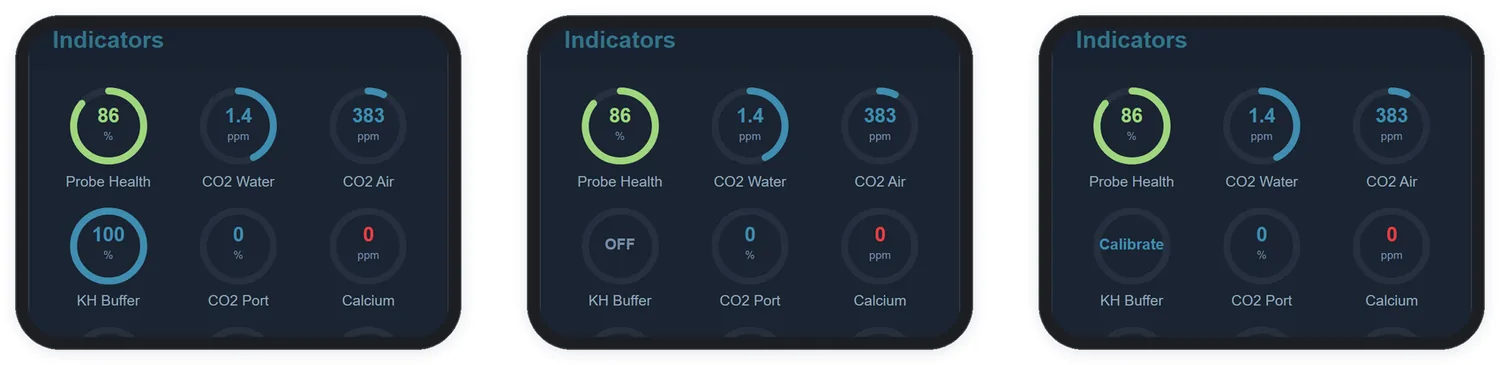
The KH Buffer indicator shows how much is left in the bottle:
| The indicator shows | Meaning |
|---|---|
| Percentage | How much is left in the bottle. It turns red below the percentage in Custom. → Low KH Buffer %, and you get a warning |
| OFF | The doser is off, or the bottle has run out |
| Calibrate | The pump has not been calibrated yet and will not dose (section 16.6) |
In the event log, the e-mail and the graph
| Where | What appears |
|---|---|
| Event log | Each dose, with the volume and how much it raised — for example, Alkalinity doser: 10.2 ml (+0.102 dKH). When the daily dosing limit is reached, Alkalinity doser: daily maximum reached appears; when it frees up, Alkalinity doser: daily maximum released |
| Notification on Dosing | If you turn it on, you receive the e-mail of each measurement that had a dose, with the dose written in it — up to 24 a day. Great in the first days, to build confidence; then turn it off |
| Graphs | The Buffer (mL) parameter shows how much was dosed over time, with the period total on its card (Chapter 21) |