Download PDF
Aquarino KH — User Manual · Printed from manual.aquarino.com.br/en/kh/20-troubleshooting/
Troubleshooting
Find what you are seeing in the table and go straight to the section. Each section starts with what fixes most cases.
| What you are seeing | Where to fix it |
|---|---|
| The home screen shows ERROR, or the panel colour LED blinks yellow | Section 20.1 |
| KH goes up and down from one measurement to the next | Section 20.2 |
| KH does not match my chemical test | Section 20.3 |
| The equipment does not connect to Wi-Fi, or the app cannot find it | Section 20.4 |
| pH does not appear, or the screen says the probe is disconnected | Section 20.5 |
| The doser does not dose, or doses more and more | Section 20.6 |
| The CO2 Port does not switch the solenoid on, stays at 100% all the time or trips the circuit breaker | Section 20.6 |
| Noise, water in a pump, empty graphs or the equipment restarting | Section 20.7 |
| pH sits near 9 and both CO2 readings are very low | Section 22.2 |
20.1 The screen shows ERROR
When a measurement cannot finish, the home screen shows ERROR, with one sentence on what happened and another on what to check, and the panel colour LED blinks yellow. No correction is ever made on top of a measurement that ended in error: your aquarium stays protected.
Check what the screen asks for and tap Resolve and try again. The equipment clears the error and starts a new measurement.
| The message is about | What to check |
|---|---|
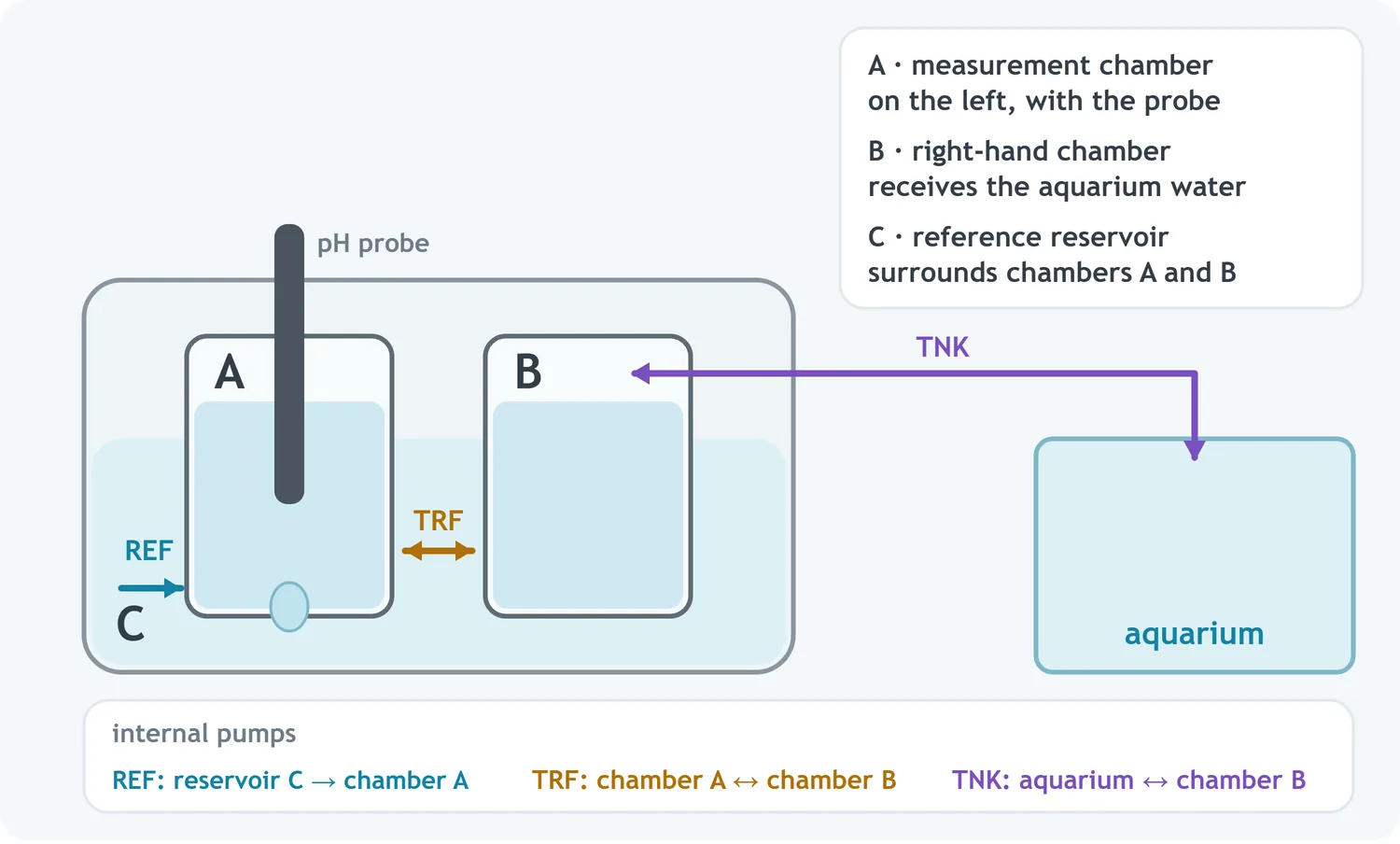
| Aquarium water not arriving, such as "Could not collect water from the aquarium" | Is the hose tip under water? Is the hose on the right-hand fitting of the Tank dosing pump, with no kinks and no dirt (section 2.2)? |
| Water not returning to the aquarium | Is the hose kinked, blocked or with its tip far above the water level? |
| A chamber that does not empty, or that "still has water" | In Configuration → Reservoirs, tap Empty and see whether the water comes out. If it does not, the internal tubing of the pump mentioned (REF, TRF or TNK) may be worn or blocked |
| A chamber that does not fill, or no reference water | The reference reservoir may be low, which usually comes from power cuts in the middle of measurements. Run a full calibration (Chapter 5) |
| Filled too fast, leftover water or overflow | Water was left where it should not be, or a level sensor is wet or dirty. Empty completely, clean the chambers and the sensors (section 13.1) and fill again |
| pH probe disconnected | Is the cable in the PH-IN input, the top one, and fully seated? See section 20.5 |
| Result out of range, or unstable automation | Check the aeration of both chambers and the health of the probe (section 20.2). If it happens again, run a full calibration |
| Doser not calibrated | Calibrate the Alkalinity Doser pump (section 15.4) |
20.2 KH readings fluctuate
It is the most common symptom, and it almost always has a simple cause. Work through these in order:
- Aeration in both chambers. Both need strong, similar airflow, with at least 5 mm of foam. Adjust it with the side valves; if the air pump is weak, clean the air system or replace the pump.
- Clean chambers. Dirt and biofilm pull the reading off little by little. Do the cleaning in section 13.1.
- pH probe. With more than 12 months in use or Probe Health below 55%, replace the probe (sections 13.4 and 13.5).
- Hose tip. Away from detritus, the skimmer and the dosing point (section 2.2).
- Temperature. The equipment away from the chiller and from heat sources.
- Stray current in the water. Switch the aquarium equipment off one item at a time and see whether the reading settles.
- Lanthanum. During treatment and for 6 to 12 hours afterwards, measurements are not reliable.
Before deciding that the reading fluctuates, open Graphs and look at the last 24 hours: a shape that repeats every day, following the lights, is the aquarium's real consumption, not a fault (section 21.3). If it keeps fluctuating, contact support: we can assess the reading circuit's statistics remotely.
20.3 KH does not match my chemical test
A small difference is expected: every chemical test has a margin of error, given in the kit's manual. If the difference is within that margin, do not recalibrate.
To compare like with like:
- collect the water from the same spot as the hose tip, at the same time the equipment measured;
- check the reagent's expiry date and how it has been stored — an expired reagent is the most common cause of "the equipment is wrong";
- if you can, run the test twice and use the average.
If the difference goes beyond the test's margin and keeps repeating, run a partial calibration (Chapter 9). If it comes back afterwards, the water may be off the usual pattern: high borate or salinity out of range change the test result without changing the carbonate reserve. Chapter 21 explains each case.
20.4 Wi-Fi and connection
| What happens | What to do |
|---|---|
| The Wi-Fi LED does not blink when adding the equipment | When it starts, it spends up to a minute trying the network it already knows; only then does it open the setup network and the LED starts blinking. On new equipment, wait that minute after the beep. If it has already been connected to a network that is still on the air, it connects to it: to change networks, use Wifi Settings on the System screen (section 23.1) |
| The wizard does not confirm the connection | See section 3.8. The network must be 2.4 GHz and have a good signal where the equipment sits (section 3.9) |
| The app or the cloud cannot reach the equipment | Under System → System Status → Network, check the signal quality and internet access (section 23.2) |
20.5 pH does not appear
| What happens | What to do |
|---|---|
| The screen says "pH probe disconnected" | Check that the cable is in the PH-IN input, the top one, and fully seated. KH-OUT, the bottom one, gives no reading. If it continues, the probe may have reached the end of its service life (section 13.4) |
| pH and CO2 Water do not appear on the home screen | They appear once the probe is calibrated (section 4.2), and CO2 Water after the first measurement |
| Probe Health is low | Below 75%, recalibrate with the equipment empty (section 4.2). Below 55%, replace the probe (section 13.5) |
20.6 Doser and CO2 Port
| What happens | What to do |
|---|---|
| Doser on, but not dosing | Check whether the home screen shows Calibrate (calibrate the pump), whether the mL to raise 1.0 dKH field is filled in, whether the bottle has product, and whether measurements are taking place (Chapter 15) |
| Dosed volume rising, with another replenishment system | Not a fault: your main system is not keeping up, and the doser makes up the shortfall. Check the reservoir, the reactor's CO2 and media, the tubing and the pumps, or increase your main system's dosage (section 16.2) |
| The event log shows that the daily dosing limit was reached | The aquarium's consumption has gone up or another replenishment failed. Check your main system; if consumption really is higher, raise the daily dosing limit (section 15.2) |
| CO2 Port always at 100% and KH falling | The reactor is not delivering: CO2 empty, media exhausted, valve blocked or too few bubbles (section 18.10) |
| CO2 Port on in the app, but the solenoid or the pump does not run | The port does not supply power. Check that the input cable (IN and N) is plugged into the wall outlet or the power supply, and that the load is rated for the same voltage (Chapter 17) |
| Circuit breaker trips when the CO2 Port switches on | The power cable has one wire in IN and the other in OUT. Unplug it and move both wires to the bottom pair, IN and N (Chapter 17) |
20.7 The equipment
| What happens | What to do |
|---|---|
| Empty graphs, updates that do not complete, or SD: Not Detected in System Status | A sign of a memory card problem. Contact support before touching anything: in many cases we can identify the cause remotely (section 13.2) |
| Noise during aeration | Check the air pump's mounting: silicone glue or double-sided tape sorts it out |
| Noise from the dosing pumps | Clean or replace the pump's internal tubing |
| Traces of water in a dosing pump | Replace that pump's internal tubing right away |
| Internal reservoir level low | Usually comes from power cuts during measurements. Run a full calibration (Chapter 5). If it drops again, a level sensor's seal may be at fault: contact support |
| Equipment restarting on its own | Check the power supply and contact support |
20.8 When to contact support
If nothing here solved it, reach us through the channels in Chapter 27. It helps a lot to send:
- a capture of the home screen and, if there is an error, of the message;
- a capture of System → System Status;
- a capture of the day's Logs;
- the equipment's UUID, shown on the System screen (section 23.1).